Discord has polls built in, so you don't need an app to ask your server a quick question. A poll can have up to 10 answers, stay open for up to a week and show the results live as members vote.
Make a poll on desktop
- Open the channel where you want the poll.
- Select the + at the left of the message box, then Create Poll.
- Type your question and up to 10 answers. You can add an emoji to each answer.
- Choose how long the poll stays open, and whether members can pick more than one answer.
- Select Post.
Make a poll on mobile
Tap the + beside the message box, then Create Poll, and fill in the question, answers and duration the same way.
Limits to know
- Answers: up to 10 per poll. Discord's developer docs allow 300 characters for the question and 55 for each answer.
- Duration: in the app you choose from 1 hour, 4 hours, 8 hours, 24 hours, 3 days or 1 week. The creator can end a poll early at any time.
- Editing: a poll can't be changed once it's posted, so check the question and answers before you post.
The details are in Discord's Polls FAQ.
Choose who can create polls
Polls have their own permission, Create Polls. Turn it on or off for a role in Server Settings > Roles, or for one channel in that channel's permissions. A common setup lets your team and moderators create polls, and members vote.
Get a plan for your Discord server
Tell us about your community and our team will send you a free plan.
Tips for better polls
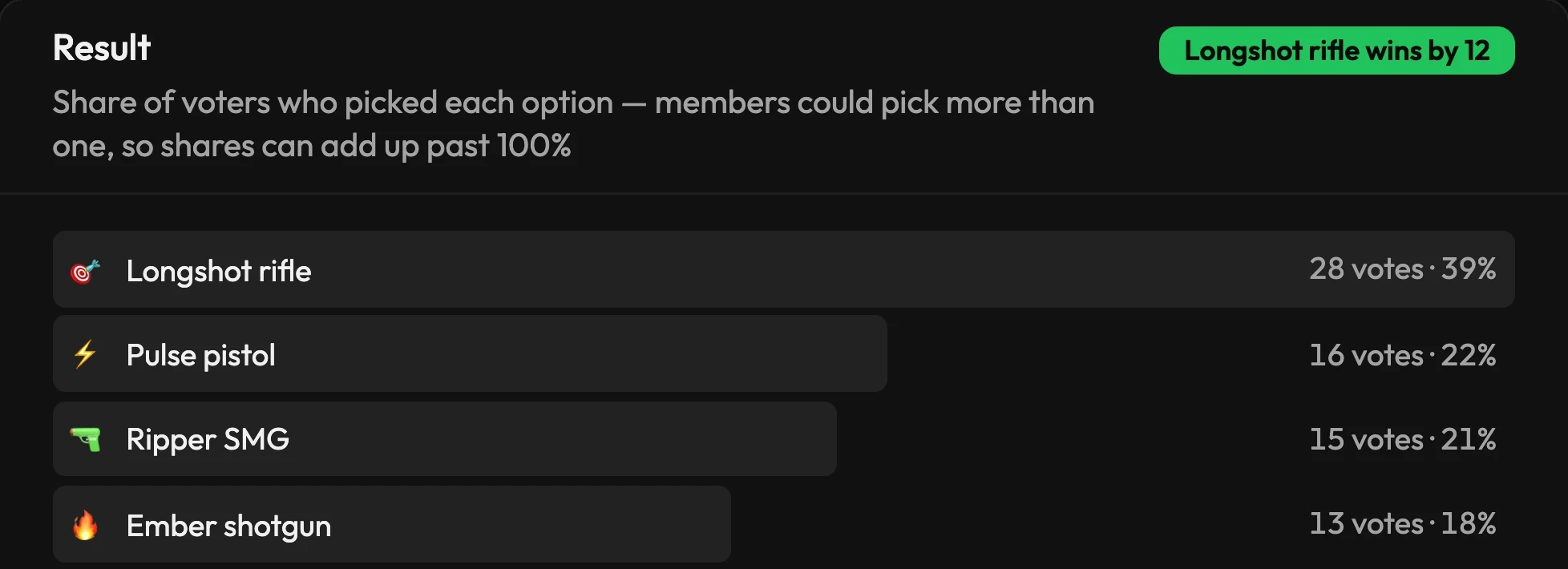
- Ask one thing per poll. "Which map should we rework first?" gets clearer answers than a question with two parts.
- Keep answers short and make sure they don't overlap.
- Pick a duration that matches how quickly you need the answer. A day is enough for most questions, and a week suits bigger decisions.
- Post the result afterwards and say what you'll do with it. Members are more likely to vote again when they can see what the last poll changed.
When a poll isn't enough
A Discord poll answers one question. For feedback after a playtest or an event, where you need several questions, ratings or written answers, use a survey instead. Our guide on how to run a survey on Discord covers the options.
Polls in CEEJAY get a quick answer from the whole server, and you can schedule them, reward voters and post the results when a poll closes. For polls that aren't anonymous, you can follow up with the members who gave each answer, and Forms collect longer feedback inside Discord.



